
 Bettercut (there is a free version with less features) I've used this to apply custom icons and text to the icons on the desktop (not widgets, just the icons) so you can use icons from free icon packs for ahome (or others) or save some png's to your sd card and use those. I like making my phone more 'mine', still using bettercut.
Friday, 31 July 2009
App Review: BetterCut
Bettercut (there is a free version with less features) I've used this to apply custom icons and text to the icons on the desktop (not widgets, just the icons) so you can use icons from free icon packs for ahome (or others) or save some png's to your sd card and use those. I like making my phone more 'mine', still using bettercut.

Thursday, 30 July 2009
App Review: Autolock
AutoLock. The pattern-lock thingy is nice and (implies?) security but it's a pain in the bum if you put your phone down for 10 seconds and then remember you have to do something else, even though I lock the buttons when I put the phone down, AutoLock doesn't engage the pattern lock for another, however long you want, 15 minutes in my case. handy. Still Using Autolock
Wednesday, 29 July 2009
App Review: Locale
 Locale is a great app, I loved it but for one thing, it really chewed up my resources, both the battery (noticibly) and slowed the phone down, the former isn't for long an issue, the latter certainly is, it's a great app which allows you to alter an array of ystem settings based on phone-state and/or location, f example I had it only activating wifi when I was at home and turning off the sound in the evenings and overnight when at home. A great app especially for free but I couldn't stomach the drag. no longer using Locale.
Tuesday, 28 July 2009
App Review: Twidgit Lite
Twidgit Lite, Is there a better, full non-'lite' version? I don't know, I'll check it out if I find one. twidgit lite sits on the desktop as a widget and shows the last twitter post, tap it and it shows the last few and allows you to post an update. you can set it's update frequency, I set mine to 15 minutes, and it sits there quite happily doing it's thing not noticeable using up your sys resources.
However in an effort so speed-up my phone I stopped using some widgets and switched to a twitter app that doesn't use any resources at all (unless you're actively using it). No longer using twidgit lite.
However in an effort so speed-up my phone I stopped using some widgets and switched to a twitter app that doesn't use any resources at all (unless you're actively using it). No longer using twidgit lite.
Monday, 27 July 2009
App Review: NetCounter
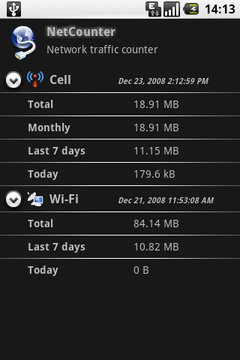 NetCounter, one of the first apps I downloaded, on day 1, it records my data use via the network and via wifi (separately) and I've set an additional record my monthly data use from the date of my account with my network with an alarm set at my limit of 1Gb, so it'll let me know, accurately within my account period if I go over my allowance (and thus risk a hefty bill). so far I'm not even close as I download most apps etc when sitting at home and thus via my wifi, but it's nice to have it there in the background, it doesn't reset on a reboot (as some do) and you can add and change the measuring periods as much as you like and it'll always be correct as it's not resetting anything, just reading the data form it's database. for anyone with any limit on their data usage it's very highly recommended. After using it for a couple of months I'm happy that I'm within my data allowance with my usage pattery - No Longer using NetCounter.
Sunday, 26 July 2009
App Review: Lock 2.0
 Lock 2.0, I loved the idea of this, a nice unlock screen which can have various skins appended to it and I can even make my own, or show the battery level on the unlock screen (as well as on the unlock screen when charging as standard) as a reminder of how much juice is left every time I pick up the phone to use it. a great idea, I bought the donate version, but it turned out it was the app responsible for making my phone a bit sluggish and I actually prefer the (implied?) security of the 9-dot pattern lock. no longer using Lock 2.0
Saturday, 18 July 2009
Back In Black
I've liked simple black themes on phones for a while, I made my own themes for my Nokia E51 with CarbideUI before I got my G1, one of the first things I did when I got the G1 was add one of my photos to it.... This is one of my photos of model Roswell Ivory (see more of my photography on my website www.MarkVarleyPhoto.co.uk it's my work).
 Now I've completed the black look with the help of: BetterCut (for changing icons), Glasklart Icon Pack (most of the icons you see) with the addition of an icon I customised with red trim for Gmail:

And Weather Widget, which uses a flip-clock with a built-in weather display on your main screen
 I'm using some custom weather icons which are a mixture of 'Klear' and 'GlossyBlack' (probably breaking several rules by doing so....)


 Click on the icon to download the zip file, save it to your sd card and then open it from within the Weather Widget control panel
 Another addition to my phone is the Matt anti-glare screen protector, I was using a mirror screen protector and although it was cool it was impossible to use in bright sunlight. I bought an InvisibleShield kit from Zagg but decided to omit the shiny screen protector. After much waiting the Boxwave Cleartouch Anti-Glare arrived (slow shipping form USA), it's a simple single piece screen that fits in seconds (as opposed to minutes for the stick-on Zagg kit), and it works, no greasy fingermarks (I hate that), massively reduced glare (you can still 'see' the reflection of light sources such as the sky when walking around but the phone is definitely usable, as opposed to barely usable without and definitely not usable with the mirror screen protector).

This is one of my photos of model Roswell Ivory (see more of my photography on my website www.MarkVarleyPhoto.co.uk it's my work). Now I've completed the black look with the help of: BetterCut (for changing icons), Glasklart Icon Pack (most of the icons you see) with the addition of an icon I customised with red trim for Gmail:
And Weather Widget, which uses a flip-clock with a built-in weather display on your main screen
 I'm using some custom weather icons which are a mixture of 'Klear' and 'GlossyBlack' (probably breaking several rules by doing so....)Click on the icon to download the zip file, save it to your sd card and then open it from within the Weather Widget control panel
 Another addition to my phone is the Matt anti-glare screen protector, I was using a mirror screen protector and although it was cool it was impossible to use in bright sunlight. I bought an InvisibleShield kit from Zagg but decided to omit the shiny screen protector. After much waiting the Boxwave Cleartouch Anti-Glare arrived (slow shipping form USA), it's a simple single piece screen that fits in seconds (as opposed to minutes for the stick-on Zagg kit), and it works, no greasy fingermarks (I hate that), massively reduced glare (you can still 'see' the reflection of light sources such as the sky when walking around but the phone is definitely usable, as opposed to barely usable without and definitely not usable with the mirror screen protector).
All apps are available in the Android Market, just search for the names as written here.
Subscribe to:
Posts (Atom)
